এনবিআর ই-রিটার্ন গাইড
NBR e-Return Guide
এনবিআর ই-রিটার্ন (e-Return) দাখিলের সম্পূর্ণ ধাপে ধাপে গাইডThe Complete Step-by-Step NBR e-Return Filing Guide
কে রিটার্ন দাখিল করবেন, কীভাবে নিবন্ধন করবেন, এবং এনবিআর e-Return পোর্টালে ৭ ধাপে কীভাবে দাখিল করবেন — সহজ ভাষায় সম্পূর্ণ ব্যাখ্যা।
Who needs to file, how registration works, and the seven steps of submitting your return on the NBR e-Return portal — explained in plain language.
এটি এনবিআর e-Return পোর্টালে ই-রিটার্ন দাখিলের সবচেয়ে নির্ভরযোগ্য গাইড — বাংলাদেশের করদাতাদের জন্য।
This is the most reliable guide to filing your e-Return on the এনবিআর portal — built for taxpayers in বাংলাদেশ. Whether you call it e-Return, e-return, or ই-রিটার্ন, the process is the same.
এনবিআর ই-রিটার্ন পোর্টালNBR e-Return Portal
etaxnbr.gov.bd
স্ট্যাটাস: বাধ্যতামূলকStatus: Mandatoryকেন গুরুত্বপূর্ণ
Why It Matters
ই-রিটার্ন দাখিল এখন বাধ্যতামূলক
e-Return Filing Is Now Mandatory
জাতীয় রাজস্ব বোর্ড (এনবিআর) যোগ্য করদাতাদের জন্য ইলেকট্রনিক রিটার্ন দাখিল বাধ্যতামূলক করেছে — ২০২৫ সালের ৪ আগস্ট জারিকৃত আদেশ নং ০১/২০২৫ অনুযায়ী, ২০২৬-২৭ কর বছরের জন্য এটি প্রায় সকল ব্যক্তি করদাতার ক্ষেত্রে প্রযোজ্য। প্রতিটি যোগ্য করদাতার একটি টিআইএন, নিবন্ধিত মোবাইল নম্বর এবং এনবিআর e-Return অ্যাকাউন্ট থাকা প্রয়োজন।
The National Board of Revenue has made electronic filing compulsory for eligible taxpayers — under Order No. 01/2025, issued 4 August 2025, this now applies to nearly all individual taxpayers for the 2026–27 tax year. Every eligible taxpayer needs a TIN, a registered mobile number, and an NBR e-Return account.
এখনো টিআইএন নেই? প্রথমে টিআইএন নিতে হবে — এটি e-Return নিবন্ধনের আলাদা, আগের ধাপ। টিআইএন সম্পর্কে বিস্তারিত পড়ুন অথবা আমাদের কাছে সাহায্য চান।
Don’t have a TIN yet? You’ll need one first — it’s a separate, earlier step from e-Return registration. Read more about TIN or get help from us.
দাখিল করতে হবে কি না?
Do I Need to File?
কারা রিটার্ন দাখিল করবেন
Who Must Submit a Return
আয়কর আইন, ২০২৩ অনুযায়ী বিভিন্ন পরিস্থিতিতে রিটার্ন দাখিল বাধ্যতামূলক। সবচেয়ে সাধারণ কারণগুলো:
Under the Income Tax Act, 2023, filing is required for a wide range of situations. The most common ones:
করমুক্ত সীমার ওপরে
Above the tax-free limit
বার্ষিক আয় করমুক্ত সীমা অতিক্রম করলে।
Your total income for the year exceeds the tax-free threshold.
আগে কর নির্ধারিত হয়েছে
Previously assessed
গত তিন বছরের যেকোনো এক বছরে আয়ের ওপর কর নির্ধারিত হয়ে থাকলে।
Tax was assessed on your income in any of the last three years.
কোম্পানি বা ফার্মের পদ
Company or firm role
অংশীদার, শেয়ারহোল্ডার-পরিচালক বা শেয়ারহোল্ডার-কর্মচারী হলে।
You’re a partner, shareholder-director, or shareholder-employee.
সরকারি বা ব্যবস্থাপনা পদ
Government or managerial staff
সরকারি চাকরি বা নির্বাহী/ব্যবস্থাপনা পদে থাকলে।
You hold a government post or an executive/managerial position.
নিবন্ধিত পেশাজীবী
Licensed professionals
ডাক্তার, আইনজীবী, প্রকৌশলী, স্থপতি, হিসাবরক্ষকসহ অন্যান্য।
Doctors, lawyers, engineers, architects, and accountants, among others.
ক্রেডিট কার্ড বা বড় ঋণ
Credit card or large loans
ক্রেডিট কার্ড থাকলে, বা ২০ লাখ টাকার বেশি ঋণ নিয়ে থাকলে।
You hold a credit card, or have taken a loan above BDT 20 lakh.
ট্রেড বা আমদানি লাইসেন্স
Trade or import licenses
ট্রেড লাইসেন্স, আইআরসি বা ইআরসি আবেদন বা নবায়ন করতে চাইলে।
You’re applying for or renewing a trade license, IRC, or ERC.
বড় সঞ্চয় বা আমানত
Large deposits or savings
বড় অঙ্কের স্থায়ী আমানত খুলতে বা সঞ্চয়পত্র কিনতে চাইলে।
You’re opening large fixed deposits or purchasing savings certificates.
নির্বাচনে প্রার্থিতা
Election candidacy
জাতীয়, সিটি বা পৌর নির্বাচনে প্রার্থী হতে চাইলে।
You’re standing for national, city, or municipal elections.
এটি সবচেয়ে সাধারণ ক্যাটাগরির সংক্ষিপ্তসার, পূর্ণ আইনি তালিকা নয়। আপনার দাখিল করা প্রয়োজন কিনা নিশ্চিত না হলে আমাদের সাথে যোগাযোগ করুন, আমরা যাচাই করে দেব। This is a summary of the most common categories, not the full legal list. If you’re unsure whether you’re required to file, get in touch and we’ll check for you.
শুরু করার আগে
Before You Start
e-Return পোর্টালে নিবন্ধন
Registering on the e-Return Portal
আগে ব্যবহার না করে থাকলে, নিবন্ধন মাত্র কয়েক মিনিটের কাজ — তবে অবশ্যই আগে টিআইএন থাকতে হবে:
If you haven’t used the system before, registration takes a few minutes — but you’ll need a TIN first:
- 01
পোর্টালে যান
Visit the portal
etaxnbr.gov.bd-তে গিয়ে “আমি এখনো নিবন্ধিত নই” নির্বাচন করুন।
Go to etaxnbr.gov.bd and select “I am not registered yet.”
- 02
টিআইএন ও মোবাইল নম্বর দিন
Enter TIN & mobile number
আপনার টিআইএন এবং জাতীয় পরিচয়পত্র দ্বারা বায়োমেট্রিক-ভেরিফাইড সিম নম্বর ব্যবহার করুন। মোবাইল নম্বরটি আগের ০ বাদ দিয়ে লিখুন (যেমন ০১৭১১ → ১৭১১) এবং ক্যাপচা পূরণ করুন।
Use your TIN and the biometric-verified SIM registered in your name. Enter the mobile number without the leading 0 (e.g., 01711 → 1711) and complete the CAPTCHA.
- 03
ওটিপি যাচাই করুন
Verify with OTP
মোবাইলে পাঠানো ৬-সংখ্যার কোড প্রবেশ করান। ওটিপি না এলে
*16001#ডায়াল করে দেখুন সিমটি এনআইডির সাথে যুক্ত কি না।Enter the 6-digit code sent to your mobile. If no OTP arrives, dial
*16001#to check your SIM is linked to your NID. - 04
পাসওয়ার্ড সেট করুন
Set a password
নিবন্ধন সম্পন্ন করতে একটি পাসওয়ার্ড নির্বাচন ও নিশ্চিত করুন।
Choose and confirm a password to complete registration.
দাখিলের দিন
Filing Day
রিটার্ন দাখিল — ৭ ধাপ
Submitting Your Return — 7 Steps
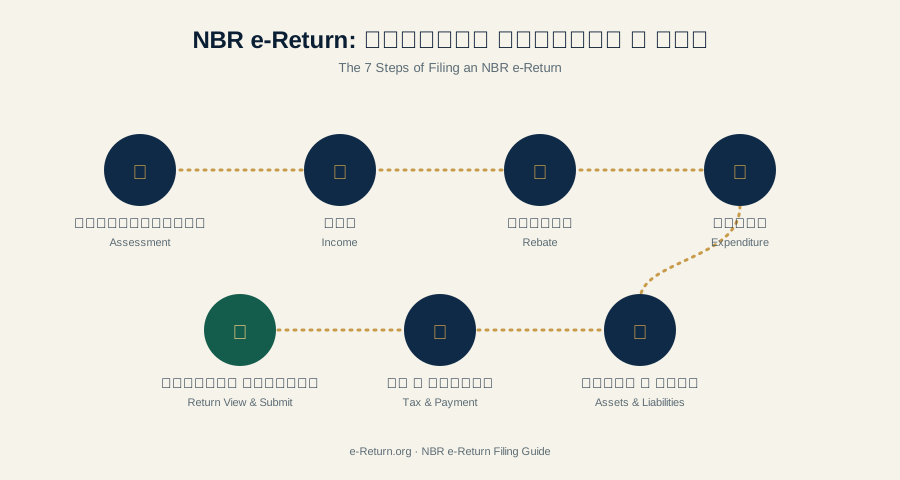
নিবন্ধন ও লগইনের পর, রিটার্ন সাতটি ভাগে বিভক্ত:
Once you’re registered and logged in, the return itself is broken into seven sections:
- 01
অ্যাসেসমেন্ট
Assessment
আপনার অ্যাসেসমেন্ট বছর ও আয় বছর নির্বাচন করুন।
Select your assessment year and income year.
- 02
আয়
Income
বেতন, ব্যবসা, কৃষি ও অন্যান্য উৎস থেকে আয়ের বিবরণ দিন।
Enter income details — salary, business, agriculture, and other heads.
- 03
রেয়াত
Rebate
বিমা ও সঞ্চয়ের মতো রেয়াতযোগ্য বিনিয়োগ যোগ করুন।
Add eligible investments such as insurance and savings that qualify for tax rebate.
- 04
ব্যয়
Expenditure
আপনার বার্ষিক পারিবারিক ও ব্যক্তিগত ব্যয় লিপিবদ্ধ করুন।
Record your annual household and personal expenditure.
- 05
সম্পদ ও দায়
Assets & Liabilities
অ্যাসেসমেন্ট তারিখ অনুযায়ী আপনার সম্পদ ও দায় ঘোষণা করুন।
Declare what you own and owe as of the assessment date.
- 06
কর ও পরিশোধ
Tax & Payment
গণনাকৃত কর পর্যালোচনা করে পেমেন্ট বা চালানের তথ্য দিন।
Review calculated tax and enter payment or challan details.
- 07
রিটার্ন প্রিভিউ
Return View
সব যাচাই করে জমা দিন এবং প্রাপ্তি স্বীকারপত্র ডাউনলোড করুন।
Check everything, submit, and download your acknowledgment slip.
কর পরিশোধ ও রসিদ
Paying Your Tax & Your Receipt
কর দিলে এ-চালান অনলাইনে তৈরি করুন, তারপর ইন্টারনেট ব্যাংকিং, ডেবিট/ক্রেডিট কার্ড বা মোবাইল ফিন্যান্সিয়াল সার্ভিস (বিকাশ, রকেট, নগদ)-এ পরিশোধ করুন। দাখিলের পর প্রাপ্তি স্বীকারপত্র ও ট্যাক্স সার্টিফিকেট সাথে সাথেই ডাউনলোড করে রাখুন।
To pay, generate an A-Challan online, then pay via internet banking, debit/credit card, or mobile financial services (bKash, Rocket, Nagad). After filing, download your acknowledgment and tax certificate right away.
সাধারণ ও সহজ কেসে সিঙ্গেল-পেজ রিটার্ন ব্যবহার করা যায় — পূর্ণাঙ্গ রিটার্নের চেয়ে ছোট। কোনটি আপনার জন্য সঠিক, নিশ্চিত হতে প্রশ্নোত্তর দেখুন।
For simple cases, the Single-Page Return is an option — shorter than the full return. Not sure which applies? See our FAQ.
সূত্র ও অফিসিয়াল লিংক
Sources & Official Links
- etaxnbr.gov.bd — অফিসিয়াল এনবিআর e-Return পোর্টাল— Official NBR e-Return portal
- nbr.gov.bd — জাতীয় রাজস্ব বোর্ডের মূল ওয়েবসাইট— National Board of Revenue’s main website
- এনবিআর e-Return সাপোর্ট: ০৯৬৪৩ ৭১ ৭১ ৭১
- NBR e-Return support line: 09643 71 71 71